You’ve probably seen a string like SGVsbG8gV29ybGQ= somewhere in a codebase, an email header, or a URL. It looks encrypted. It looks complicated. It looks like something you’d need a computer science degree to understand.
Here’s the twist: that string isn’t encrypted at all. It’s not even that complicated once you see how it’s built.
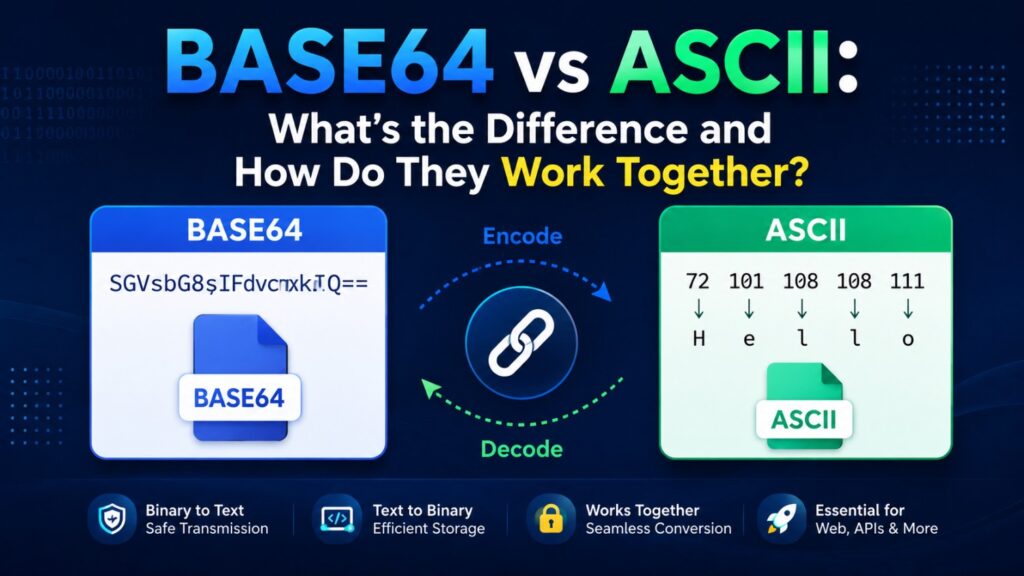
And here’s the part that trips up most people, including a lot of developers: Base64 and ASCII aren’t two competing systems. Base64 is actually built on top of ASCII. Once you understand that relationship, both concepts click into place.
By the end of this article, you’ll know exactly what ASCII is, what Base64 is, how they connect, and when you’d actually use each one in real projects.
What Is ASCII?
ASCII stands for American Standard Code for Information Interchange. It’s one of the oldest character encoding standards still in daily use, and it was designed in the 1960s to solve a simple problem: computers needed an agreed-upon way to turn letters, numbers, and symbols into numbers a machine could store and process.
Here’s the core idea. ASCII assigns a number to every character in a fixed set of 128 characters. That set includes:
- Uppercase and lowercase English letters (A–Z, a–z)
- Digits (0–9)
- Punctuation and symbols (!, @, #, %, etc.)
- Control characters (like line breaks and tabs, which don’t print visibly but tell the system to do something)
Each of these characters fits into 7 bits of data, which is often padded to a full byte (8 bits) for how modern computers actually store it.
A quick example:
The letter “A” is stored as the number 65 in ASCII. In binary, that’s:
A = 65 = 01000001
Every character you type on a standard US keyboard has a matching ASCII number behind the scenes. That’s the whole system — a lookup table connecting characters to numbers.
Where ASCII falls short
ASCII was built for English text on early computer systems. It doesn’t cover accented letters, most non-English scripts, emoji, or raw binary data like images and files. That gap is exactly why Base64 exists — but not for the reason you might think. Base64 isn’t for representing more characters. It’s for smuggling binary data through systems that only understand text.
What Is Base64?
Base64 is an encoding method that converts binary data (like an image file, a PDF, or encrypted content) into plain text — specifically, into a set of 64 characters that are all part of the standard ASCII alphabet.
Why would anyone need to do that? Because a lot of older systems, protocols, and formats were designed to handle text only. Email systems, for example, were originally built to move plain text messages, not binary files. If you tried to send a raw image file through one of those systems, parts of it could get corrupted or misread as control commands instead of data.
Base64 solves this by repackaging binary data into safe, printable text that any text-based system can pass along without breaking it.
The character set Base64 uses:
- A–Z (26 characters)
- a–z (26 characters)
- 0–9 (10 characters)
+and/(2 characters)=(used only for padding at the end)
That’s 64 usable characters, which is where the name comes from.
How the encoding actually works:
- Binary data is split into chunks of 6 bits (instead of the usual 8-bit bytes).
- Each 6-bit chunk is matched to one of the 64 characters in the Base64 table.
- If the final chunk doesn’t divide evenly,
=padding is added to complete it.
A simple example:
The word “Man” encoded in Base64 becomes:
Man → TWFu
And if you decode TWFu, you get “Man” straight back. No information is lost — Base64 is fully reversible. That’s an important distinction from something like hashing, which is one-way.
Base64 vs ASCII: Key Differences
It helps to see these side by side.
| Aspect | ASCII | Base64 |
|---|---|---|
| What it is | A character encoding standard | A data encoding method |
| Purpose | Represents text characters as numbers | Represents binary data using text characters |
| Character set size | 128 characters | 64 characters |
| Bits per unit | 7–8 bits per character | 6 bits per character |
| Human-readable? | Yes, directly | Not directly — looks like random text |
| Common use cases | Plain text files, source code, terminals | Emails, embedded images, API tokens, config files |
| Reversible? | N/A (it’s a direct mapping) | Yes, fully reversible |
The most important thing to clear up here: Base64 is not encryption, and it’s not a security feature. Anyone can decode a Base64 string in seconds using nothing more than a browser tab. If you see Base64 used to “hide” something like a password in a config file, that’s a red flag, not a safeguard. Its entire job is safe transport, not confidentiality.
How Base64 and ASCII Actually Work Together
This is the part most explanations skip, and it’s the part that actually matters.
Base64 doesn’t create new characters. It doesn’t invent its own alphabet. Every single character that comes out of a Base64 encoder — A, W, F, u, the +, the /, even the = — is a standard ASCII character.
Think of it this way:
Binary data → split into 6-bit chunks → matched to Base64 table → output written in ASCII
Base64 is essentially a translator. It takes binary data that can’t safely travel through text-only systems and re-expresses it using characters that every text system already understands, because those characters are ASCII.
That’s why a Base64 string can be dropped into a JSON file, an XML document, a URL, or an email body without breaking anything. The receiving system doesn’t need to know anything special about binary formats — it just sees ASCII text, which it already knows how to handle.
So the relationship in one sentence: ASCII is the alphabet Base64 writes in.
Real-World Use Cases
You’ve almost certainly used Base64 without realizing it. Here’s where it shows up:
1. Embedding images directly in HTML or CSS
Instead of linking to a separate image file, developers sometimes embed the image data directly:
<img src="data:image/png;base64,iVBORw0KGgoAAAANSU...">
This avoids an extra network request for small images.
2. Sending attachments over email
Email protocols were built for text. When you attach a photo to an email, it gets Base64-encoded behind the scenes (as part of the MIME standard) so it can travel through the same text-based pipes as the rest of the message.
3. Storing binary data in JSON or XML APIs
JSON has no native way to represent raw binary data. If an API needs to send a file, a signature, or an image inside a JSON response, Base64 is the standard workaround.
4. Encoding tokens and credentials
Formats like JWT (JSON Web Tokens) and HTTP Basic Authentication headers use Base64 to encode structured data into a single text string. Again — this is encoding for compatibility, not encryption for security.
This behavior isn’t arbitrary; it’s standardized. The official specification for Base64 is documented in RFC 4648, maintained by the IETF, which defines exactly how the encoding and character table should work across all systems.
How to Convert Between Base64 and ASCII
There are two ways to do this: writing a quick line of code, or using a converter tool when you just need a fast answer without opening an editor.
If you’re comfortable with code:
In Python:
import base64

# Encoding text to Base64
encoded = base64.b64encode(b"Hello World")
print(encoded)  # b'SGVsbG8gV29ybGQ='

# Decoding Base64 back to text
decoded = base64.b64decode(encoded)
print(decoded)  # b'Hello World'
In JavaScript (runs directly in a browser console):
// Encoding
btoa("Hello World"); // "SGVsbG8gV29ybGQ="

// Decoding
atob("SGVsbG8gV29ybGQ="); // "Hello World"
Both approaches work fine, and if you’re a developer, you’ll likely reach for these often.
If you just need a quick conversion:
Sometimes you don’t want to open a terminal for a one-off conversion — you just have a Base64 string and need to see what’s actually inside it. For that, a browser-based Base64 to ASCII converter does the job in seconds.
Here’s how to use it:
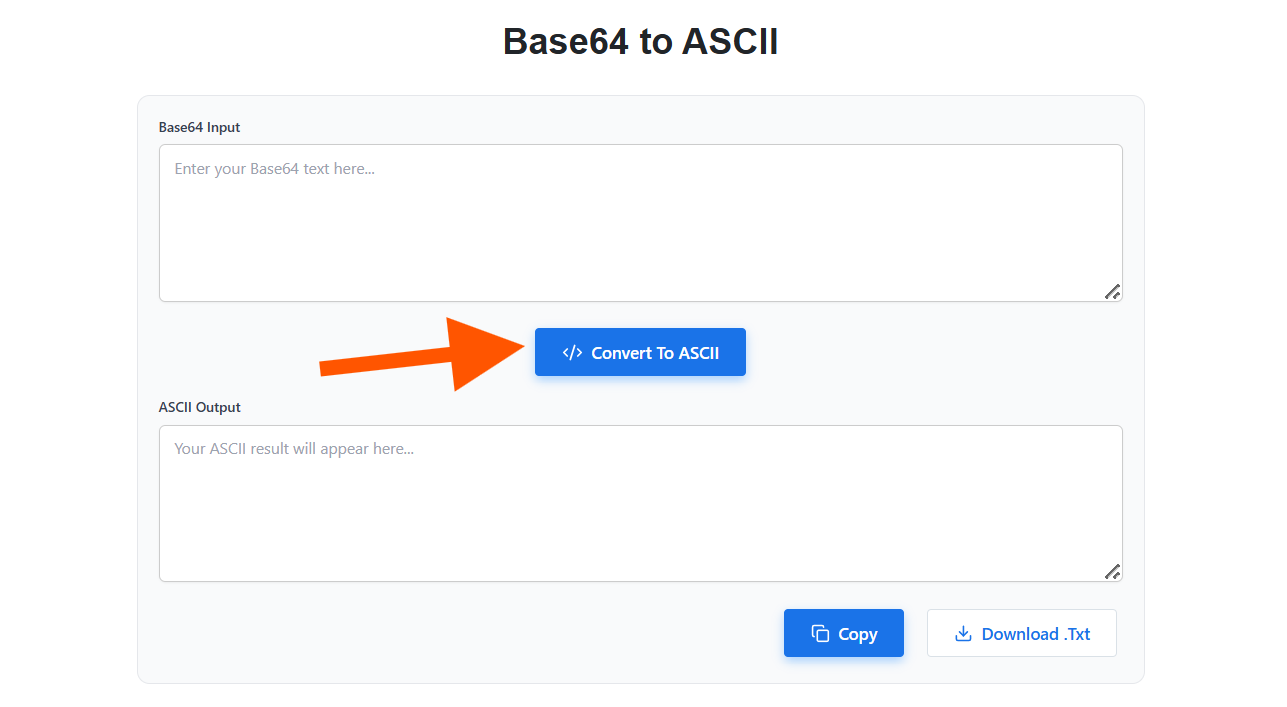
- Open the converter in your browser.
- Paste your Base64 string into the input field.
- Click the Convert to ASCII button.
- The decoded ASCII text appears immediately — copy it or use it however you need.
Want to convert plain text into Base64? Use our ASCII to Base64 Converter to quickly encode your ASCII text into Base64 format.
A couple of things worth knowing before you convert anything:
- Strip out extra line breaks or spaces if you copied the Base64 string from somewhere else, since stray whitespace can cause decode errors.
- Make sure the string ends with proper
=padding if the source expects it — some tools add this automatically, but it’s good to double-check if you’re getting unexpected results.
Common Errors and How to Fix Them
If you’ve ever tried decoding Base64 manually and hit an error, it’s usually one of these:
“Invalid character” error Base64 only uses A–Z, a–z, 0–9, +, /, and =. If your string picked up extra characters (like a stray line break copied from an email or PDF), the decoder will reject it. Clean up the string first.
Padding errors Base64 strings need to be a length divisible by 4. If padding = characters got trimmed somewhere along the way (this happens a lot when strings are passed through URLs), you’ll need to add them back manually.
Confusing Base64 with URL encoding URL encoding (things like %20 for a space) and Base64 solve different problems. URL encoding makes text safe for URLs specifically. Base64 makes binary data safe for text systems generally. They’re not interchangeable, and mixing them up is a common source of bugs.
Confusing Base64 with hashing Hashing (like SHA-256) is one-way — you can’t reverse a hash back into the original data. Base64 is two-way by design. If someone tells you Base64 “protects” data, that’s a misunderstanding of what it’s actually for.
Frequently Asked Questions
Is Base64 the same as encryption?
No. Base64 is an encoding method, not an encryption method. It has no secret key and no security purpose — it’s purely about making binary data safe to transmit through text-based systems. Anyone can decode it instantly.
Why does Base64 make data about 33% larger?
Because it converts 8-bit bytes into 6-bit chunks represented by full characters, plus occasional padding. That inefficiency is the tradeoff for universal text compatibility.
Can Base64 handle all Unicode characters, not just ASCII?
Base64 encodes binary data, so technically yes — it can encode UTF-8 text (which supports emoji, accented characters, and non-Latin scripts) because UTF-8 text is just another form of binary data underneath. The output characters, though, will always be from that same 64-character ASCII-based set.
Is ASCII still relevant now that UTF-8 exists?
Yes, in a specific way: UTF-8 was actually designed to be backward-compatible with ASCII. The first 128 characters in UTF-8 are identical to standard ASCII. So ASCII didn’t disappear — it became the foundation UTF-8 was built on. You can read more about this relationship on Unicode.org.
Can I decode Base64 without an internet connection?
Yes. Most operating systems have built-in command-line tools for this (like base64 --decode on Linux/macOS), and any code editor with a scripting language can do it offline in a couple of lines, as shown earlier in this article.
Wrapping Up
Here’s the simplest way to hold onto this concept: ASCII is a character set. Base64 is an encoding method that happens to write its output using that character set.
ASCII gave early computers a shared language for text. Base64 later used that same shared language to solve a completely different problem — moving binary data safely through systems that only trust plain text.
Neither one replaced the other. They’re doing different jobs, and Base64 quite literally depends on ASCII to function.
Next time you spot a string like SGVsbG8=, you’ll know exactly what’s happening under the hood — and if you ever need to decode one quickly, a Base64 to ASCII converter will save you from writing a script for a one-off task.